your first script!
this will show you how to write a script, import it, and run it!
1. open the editor
open the online editor in your browser or use vscode with the extenstion
2. write a script
create a new script called greeting and paste this in:
@Katton.command(name = "greeting", permission = "aladmin")
function greetSender(sender, args) {
    sender.sendMessage("&ahi there! you typed: " + args)
}
a few things to notice immediately:
@Katton.command(name = "greet", permission = "all")is what makes this runnable at all. without it,greetSenderis just a helper function nobody can call directlypermission = "admin"means only the admin can run it
3. get the import token
in vscode, press f1 then choose Katton: export token and you will get something like:
KTN1H4sIAAAAAAAAA0vOzytJzStRSMlPz1XIzC1LrShIzS...that token is your entire script compressed
4. import it in game
copy the whole token the editor gives you and run this command in game:
/katton import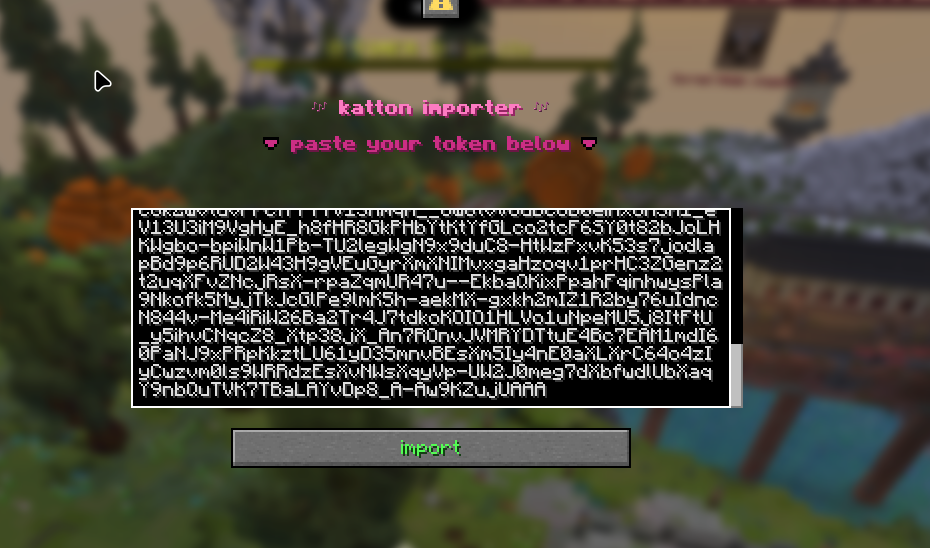
then, paste the token you copied into the input field and finally press the import button, if it compiles cleanly, you will see:
imported script 'greeting' (1 command(s), 0 listener(s))if there's a mistake, you'll get an exact line and column instead
5. run it
/katton run greet nice to meet youyou (assuming you're the current admin or running this in your custom preset) will see:
hi there! you typed: [nice, to, meet, you]notice how args came through as a list of separate words, not just a single string. see variables & values and the command annotation page for how arguments work
6. make changes
edit the script in the editor, get a import token, and run /katton import again with the same script name which will replace the old version. if the new version fails to compile, your old working version keeps running untouched
next steps
- commands reference has every
/kattonsubcommand - syntax basics shows you the language